Complete Guide to 3D Printers Covering Types, Uses, Functions, and Applications
Introduction 3D printing has changed the way products are designed, tested, and manufactured. What was once a technology used mainly by research laboratories and large manufacturers is now available to businesses, educational institutions, healthcare providers, hobbyists, and even home users. As the technology continues to improve, 3D printers are becoming faster, more accurate, and capable of producing parts from a growing range of materials. A 3D printer creates three-dimensional objects by building them layer by layer from a digital design. This process, known as additive manufacturing, differs from traditional manufacturing methods that often remove material through cutting, drilling, or machining. By adding material only where needed, 3D printing can reduce waste and enable the creation of complex shapes that are difficult or impossible to produce using conventional methods. This guide explains how 3D printers work, the different types available, their common applications, benefits, limitations, key features, current trends, and practical tips for choosing and maintaining a printer.
What Is a 3D Printer?
A 3D printer is a machine that converts a digital 3D model into a physical object by depositing or solidifying material layer by layer. The design is typically created using Computer-Aided Design (CAD) software or downloaded from online model libraries.
The general printing process includes:
- Creating or downloading a 3D model.
- Preparing the model using slicing software.
- Sending the file to the printer.
- Printing the object layer by layer.
- Removing supports if necessary.
- Cleaning and finishing the printed object.
Because of this flexible workflow, 3D printing is suitable for rapid prototyping, customized production, educational projects, and industrial manufacturing.
How 3D Printers Work
Although printing technologies vary, most follow a similar process.
- A digital model is designed or imported.
- Slicing software converts the model into printable layers.
- The printer reads these instructions.
- Material is deposited or cured one layer at a time.
- Each layer bonds with the previous one until the object is complete.
Depending on the technology used, materials may include plastic filaments, liquid resin, metal powder, ceramic materials, or specialized composites.
Benefits and Limitations of 3D Printing
Benefits
- Enables rapid prototyping and faster product development.
- Produces highly customized products.
- Reduces material waste compared to subtractive manufacturing.
- Creates complex geometries that traditional manufacturing cannot easily produce.
- Supports low-volume production economically.
- Simplifies design modifications.
- Suitable for educational and research applications.
Limitations
- Printing speed may be slower than traditional manufacturing for large production runs.
- Material selection varies depending on printer type.
- Some printed parts require post-processing.
- Industrial-grade machines can be expensive.
- Surface finish may require additional treatment.
- Large objects may exceed printer build volume.
Main Types of 3D Printers
Different technologies are designed for different applications.
| Printer Type | Primary Material | Common Uses | Advantages |
|---|---|---|---|
| FDM (Fused Deposition Modeling) | Plastic filament | Education, prototypes, hobby projects | Affordable and easy to use |
| SLA (Stereolithography) | Liquid resin | Dental models, miniatures, detailed prototypes | High precision and smooth finish |
| DLP (Digital Light Processing) | Resin | Jewelry, healthcare, product design | Fast and detailed printing |
| SLS (Selective Laser Sintering) | Nylon powder | Functional engineering parts | Strong components without support structures |
| DMLS/SLM | Metal powder | Aerospace, automotive, medical implants | High-strength metal parts |
| Binder Jetting | Powder materials | Sand molds, prototypes | High production speed |
| Material Jetting | Photopolymer | High-detail visual models | Excellent surface quality |
Common Materials Used
The choice of material affects strength, flexibility, appearance, and durability.
PLA
- Easy to print
- Biodegradable under industrial conditions
- Popular for beginners
- Suitable for educational models
ABS
- Strong and impact resistant
- Used for functional parts
- Requires controlled printing temperatures
PETG
- Durable
- Moisture resistant
- Suitable for practical components
TPU
- Flexible
- Used for phone cases, seals, and wearable products
Nylon
- High strength
- Excellent wear resistance
- Common in industrial applications
Resin
- Produces highly detailed models
- Frequently used in dentistry and jewelry
Metal
Common materials include:
- Stainless steel
- Titanium
- Aluminum
- Cobalt chrome
These are mainly used in industrial manufacturing.
Applications of 3D Printers
Manufacturing
Manufacturers use 3D printers to produce:
- Functional prototypes
- Production tooling
- Assembly fixtures
- Custom machine parts
Healthcare
Healthcare professionals use 3D printing for:
- Dental models
- Surgical planning
- Prosthetic devices
- Orthopedic implants
- Medical education
Automotive Industry
Applications include:
- Prototype development
- Lightweight components
- Custom replacement parts
- Manufacturing tools
Aerospace
The aerospace industry uses 3D printing for:
- Lightweight structural parts
- Engine components
- Aircraft interior components
- Rapid prototyping
Education
Schools and universities use 3D printers to teach:
- Engineering
- Design
- Architecture
- Robotics
- Science concepts
Architecture
Architects create:
- Scale building models
- Urban planning models
- Interior layouts
Consumer Products
Businesses manufacture:
- Decorative products
- Customized accessories
- Household items
- Fashion components
Functions of a 3D Printer
Modern 3D printers perform several important functions.
Rapid Prototyping
Designers can quickly test new product ideas before mass production.
Custom Manufacturing
Products can be personalized without expensive tooling changes.
Small Batch Production
Ideal for producing limited quantities economically.
Product Testing
Engineers can evaluate size, fit, and function before manufacturing.
Educational Demonstrations
Students gain practical understanding of engineering and design concepts.
Key Features to Consider
Choosing a 3D printer involves evaluating several important specifications.
Build Volume
The build volume determines the maximum object size that can be printed.
Print Resolution
Higher resolution produces finer details and smoother surfaces.
Printing Speed
Faster printers reduce production time but should still maintain quality.
Material Compatibility
Some printers support only one material, while others accept multiple filament or resin types.
Heated Bed
A heated print bed improves adhesion and reduces warping.
Automatic Bed Leveling
This feature simplifies setup and improves print consistency.
Connectivity
Modern printers may support:
- USB
- Wi-Fi
- Ethernet
- Cloud printing
Software Compatibility
Ensure the printer supports commonly used slicing software.
Latest Trends and Innovations
3D printing technology continues to evolve across industries.
Multi-Material Printing
Some printers can combine different materials in a single print.
Multi-Color Printing
Advanced printers allow multiple colors without manual intervention.
Faster Printing Technologies
Improved hardware and software continue to reduce print times.
Artificial Intelligence Integration
AI-assisted monitoring helps detect printing errors and improve reliability.
Sustainable Materials
Manufacturers are developing recycled and environmentally responsible printing materials.
Metal Additive Manufacturing
Industrial metal printing continues expanding into aerospace, medical, and automotive sectors.
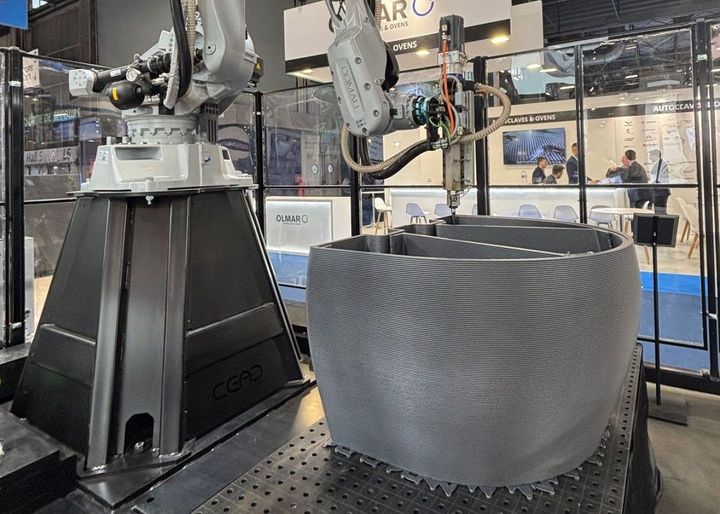
Large-Scale Construction Printing
Large-format printers are being explored for construction projects and architectural components.
Top 3D Printer Companies
Several manufacturers are well known for developing reliable 3D printing technologies.
| Company | Known For | Suitable Users |
|---|---|---|
| Ultimaker | Professional FDM printers | Education and businesses |
| Prusa Research | Open-source FDM printers | Hobbyists and professionals |
| Bambu Lab | High-speed consumer printers | Home and professional users |
| Formlabs | Professional resin printers | Healthcare, engineering, design |
| Creality | Affordable desktop printers | Beginners and hobbyists |
| Raise3D | Industrial and professional FDM systems | Manufacturing |
| Stratasys | Industrial additive manufacturing | Large enterprises |
| EOS | Metal and polymer industrial printers | Aerospace and manufacturing |
| Markforged | Composite and metal printing | Industrial engineering |
When comparing manufacturers, consider:
- Supported materials
- Software ecosystem
- Customer support
- Availability of spare parts
- Community resources
- Maintenance requirements
How to Choose the Right 3D Printer
The best printer depends on your intended use.
For Beginners
Consider:
- Easy setup
- Automatic bed leveling
- Affordable filament
- Active user community
For Education
Look for:
- Safe operation
- Reliable software
- Low maintenance
- Durable construction
For Product Design
Prioritize:
- High resolution
- Material flexibility
- Accurate dimensions
- Reliable print quality
For Manufacturing
Focus on:
- Industrial reliability
- Large build volume
- Production speed
- Advanced material support
3D Printer Selection Checklist
Use this checklist before making a decision.
- Define your primary application.
- Determine your budget.
- Check supported materials.
- Compare print quality.
- Evaluate build volume.
- Review maintenance needs.
- Verify software compatibility.
- Consider future upgrade options.
- Research customer support.
- Read independent user reviews.
Tips for Best Use and Maintenance
Proper maintenance improves reliability and extends printer life.
Clean Regularly
Remove dust and leftover material after printing.
Level the Print Bed
Correct bed leveling improves first-layer adhesion.
Store Materials Properly
Keep filaments and resin away from moisture.
Update Firmware
Install manufacturer updates when available.
Lubricate Moving Parts
Follow maintenance recommendations for rails and bearings.
Inspect Components
Check belts, nozzles, fans, and wiring periodically.
Replace Worn Parts
Replace nozzles and consumable components before they affect print quality.
Use Recommended Materials
Using compatible materials helps prevent printing issues.
Comparison of Common 3D Printing Technologies
| Feature | FDM | SLA | SLS |
|---|---|---|---|
| Cost | Low | Medium | High |
| Print Detail | Good | Excellent | Very Good |
| Material Strength | Good | Moderate | Excellent |
| Surface Finish | Moderate | Excellent | Good |
| Ease of Use | Easy | Moderate | Advanced |
| Typical Users | Beginners, schools | Designers, dentists | Industrial manufacturers |
Frequently Asked Questions
Are 3D printers suitable for beginners?
Yes. Many entry-level FDM printers are designed with simple setup procedures and user-friendly software.
What software is needed for 3D printing?
Most users create models using CAD software and prepare them for printing with slicing software that generates printer instructions.
How long does a typical print take?
Print time depends on object size, detail, material, and printer speed. Small models may take under an hour, while larger or more detailed prints can require many hours.
Which material is best for beginners?
PLA is commonly recommended because it is easy to print, widely available, and requires relatively simple printer settings.
Can 3D printers produce metal parts?
Yes. Specialized industrial printers use metal powders and advanced printing technologies to manufacture durable metal components.
Is 3D printing environmentally friendly?
Compared with some traditional manufacturing methods, additive manufacturing can reduce material waste. However, environmental impact depends on the materials used, energy consumption, and recycling practices.
Do printed parts require finishing?
Some parts can be used immediately after printing, while others may need support removal, sanding, polishing, painting, or curing depending on the printing technology.
Conclusion
3D printing has become an important technology across manufacturing, healthcare, education, engineering, architecture, and product design. Its ability to produce customized, complex, and functional parts directly from digital models has made it a valuable tool for organizations of all sizes and individual users alike.
Understanding the differences between printing technologies, materials, features, and applications can help you choose a solution that matches your needs. Whether your goal is learning the basics, developing prototypes, producing functional components, or exploring advanced manufacturing methods, selecting the right printer involves balancing print quality, material compatibility, ease of use, maintenance requirements, and long-term value.
As materials, software, and hardware continue to advance, 3D printing is expected to become even more accessible and capable, supporting new opportunities for innovation, education, and practical problem-solving across many industries.